Showing posts with label ict. Show all posts

Sunday, 22 September 2013

my multimedia server based on Synology

In this blog I explain you how I created the (for me) ideal environment for keeping my important documents save and backed up and at the same time benefit from some extra features the Synology server offers.

first a bit of history: 
My geeky side always wants to try out professional stuff and use it at home. So for years (2002-2009) all my files, consisting of a few gigabyte of business & personal documents and hundreds of gigabytes of music, videos and photographs where hosted on a Windows Small Business Server (SBS) in our basement. But when I realized what the power-consumption of my 24x7 standby Quad-XEON server was I decided to downsize and move everything to a WD MyBook WorldEdition, a small 1 disk NAS. With a 2TB hard-disc in it, the important documents also safely in the cloud with DropBox and/or GoogleDrive, this offered enough space. My unstable Exchange-Outlook environment was migrated to Google Apps with GMail and this turned out much better then I ever hoped. My XBMC-devices around the house could access the media files on the MyBook via LAN or WiFi. 

Until one day the disc in the MyBook started making strange noises, rebooting, taking hours to re-index all media-files and in the end I even lost some pictures I'd rather not had lost. It was finally time for Synology. I already heard a lot of it from friends (via social media) and I quickly opted for the DS213+ model, a pretty fast 2-disc NAS, so possible to mirror the data. I started building it with one 3TB WD RED (specially developed for NAS-purpose) and when everything worked I added a second 3TB WD RED disc so my data would be constantly mirrored (Raid1). Maybe a 4-disc NAS with a Raid5/10 scheme would've been better and more efficient but that also comes with a different price-tag. 

So now I have my Synology DS213+ up and running. It keeps copies of my personal and business documents which I now primarily store in the GoogleDrive and Dropbox clouds so I can access them from wherever I am and from whatever device I am using (PC at home, laptop at work, tablet or smartphone on the road). The Synology Operating System or DiskStation Manager (DSM) as they call it is a very powerful Linux based OS which allows even non-Linux users to benefit from a real server. It is amazing if you see what you can get out of this little box. All my printers are shared and we can directly print from the computers, iPads, iPhones, Android tablets and smartphones. Video and music are streaming to DLNA devices like our smart TV, tablets and phones. We're browsing through all our digital pictures/albums on the TV or tablet. And I even connected an outside IP Security Camera which I can see from wherever I am on my smartphone. You can manage users and groups in case you do not want everyone to have access at everything.

Backup options
Even though my data is stored on 2 different harddrives it is still not safe, what if our cellar floods or the house burns down? My video and music collection is not so important, my documents are stored in various clouds, but the tens of GBs of pictures we shot over the last years is not something I would like to loose. The Synology offers some interesting back-up solutions in different price ranges. For my pictures I choose Amazon Glacier backup. It is a very economic solution, I pay less then 1US$ per month to store around 20GB of pictures on Amazon's servers in Ireland. It is not as easy accessible as other cloud solutions but I will only need it in case of emergency. From my PC I also make a copy to Copy.com where I got a lot of storage for free by inviting friends (follow this link and start with 15+5GB for free)

Bonus for the MultiMedia freaks
For those who like to download movies and TV shows there's a whole bunch of Apps in a community available for the Synology. After some attempts with various tools/apps I came up with this set-up:


  • SABnzbd for downloading content from Usenet* (a paid usenet provider will be necessary);
  • SickBeard an app that automatically monitors if there are new episodes of my favourite TV Shows (like Dexter, Breaking Bad, the Big Bang Theory) available and if he pushes them to SABnzbd;
  • CouchPotato is to movies what SickBeard is to TV Shows.


read this blog to find out more about how to install and configure them on your Synology. I used this manual too and it fitted me right, especially since also I prefer to watch via XBMC.

*) to be able to use Usenet you will need a paid subscription to one of the Usenet providers. I use NewsDemon which offers a good and fast service (I can download at the maximum bandwidth my provider offers). Warning: downloading copyright protected content from Usenet is not legal everywhere so I strongly recommend you inform yourself before doing anything illegal. Oh, and do not blame me of course ;-)

And finally there is COPS, a Calibre-based App for easily accessing all your eBooks and ePubs from your tablet/e-reader on the server.


...and what does this all cost?
The hardware can be yours around 600€ for a Synology DS213+ w/ 2 mirrored harddrives of 3TB, but I also build a solution around the cheaper 1-disc DS112j (250€ incl. one 2TB disc) which works just fine as long as you do not download and stream at the same time.
In case you need help setting it up, just leave me a comment or contact me via the known social media (see right column)


Friday, 3 May 2013

iOS is not build for sharing content

Normally I take out my iPad late at night and start reading business related news, updates and blogs. On Google Currents or FlipBoard. The most interesting content I share to BufferApp,  Twitter, Facebook, tumblr, LinkedIn, Google+, etc whatever I think suits best.

Today I was activated FlipBoard on my HTC One while waiting for my daughter and I suddenly realized (pretty late I admit ) that I should quit using my iPad for sharing., iOS is not build for sharing content. You can only share to the standard channels which apple allows: twitter, Facebook and email. No direct link to tumblr, BufferApp or any other app that imho suits best for sharing the content. In Android I can share to any App via the share functionality in the menu. And mostly you share rich content, so not just a link to an article but also a thumbnail an intro text etc...

It's time I order an Android tablet.

Thursday, 13 September 2012

9 months without iPhone


because of questions on Google+ asking for my experience/opinion about a switch from iOS to Android I wrote this response which might also be interesting outside of Google+ 

Over the last 3 years (iPhone3G in 2008, iPhone3Gs in 2009, iPhone4 in 2010) I had spend a serious amount of money in the AppStore (w/ Navigon Europe for €89 being my most expensive App). I had at least €200 worth of Apps on my iPhone4 in september 2011 when Apple did not give me the larger iPhone5 I wanted/needed. Nevertheless the lock-in relation I had with the iTunes AppStore I decided to give other platforms a chance. The most important reasons to move away from iOS start looking around: I was expecting the larger screen iPhone5 and I was heavily disappointed when they showed just the 4s. But more important I was very disappointed in iCloud/MobileMe: not your own email domain (always a @me.com-address), iCloud's Agenda/Mail/Contacts are incompatible with everything out there other than Macs (apart from a 1990s type of synchronization in Outlook) so they already forced me to switch entirely to GoogleApps. And that's were I started to look to Android.


But first I played for about 3-4 weeks with an HTC HD7 w/ Windows Phone 7.5 Mango. It was a true disappointment, apart from the particular interface I couldn't get used too there were no Apps available that could satisfy me. apart from email, agenda and calling my phone needs a good Twitter App... and for WP at that time (October 2011) there was nothing. the WP-designs were too slick and lean. I hope to give the Nokia Lumnia 920 w/ WP8 a try soon to see how HW, OS and Apps have developed in a year time.
Sidenote: I think coming from the Apple iOS springboard (all these icons on your screen) the step to Windows Phone is a giant one. From Android, with all its widgets, the WP-Tiles maybe make more sense, they do not feel so different (good point in favour of Android: it combines the best of both)
So after my short flirt with WP I bought an Android device, the Google Samsung Galaxy Nexus, now 9 months ago (hence the title od this blog). No HTC Sense or Samsung TouchWiz skins to ruin the work of Google's programmers, the real stuff, Google's Android Vanilla interface. It was the the first Android device with OS 4 Ice Cream Sandwich. And OMG how I regretted my choice for at least 1-2 months. OS 4.0.0/4.0.2 was still very buggy (unstable Wifi connections, OS-crashes, Apps crashing). Only when 4.0.4 came I could relax and everything finally worked as I expected and I started to enjoy Android. Since 2 months there's JellyBean available for the Galaxy Nexus and it is fantastic, a few neat enhancement/improvements but above all a much smoother interface, for sure better then iOS5 on any of the iPhones I've seen (so that excludes the latest iPhone5).

Would I do this switch again? Knowing what I know now: yes, for sure! The integration with the Google applications (Gmail, GDrive/Docs, Picasa, etc) is perfect, I love the flexibility of Agenda/Calendar, Contacts and Email. I wouldn't be able to live again with iOS shortcomings such as having to launch the Calendar-App to see if you have any upcoming appointments (why not on the lockscreen?) or the lack of a some simple buttons (widgets) to switch WiFi on/off, or datasync (in case of roaming), etc. I would probably end up jailbraking the iPhone again (as I did with all my iPhones) in order to get the iPhone to do what I want it to do. In fact one of my best read blogs ever (from Dec 2009, in Dutch) is about how to get more out of the iPhone. But my experience with Jailbraking is that it does make the iPhone unstable (not the JB itself, but some Cydia Apps do). I had to (soft)reboot at least once or twice a day.

my main homescreen with 
Calendar, Gmail and 
Evernote widgets 
Now to the Apps: I like to play around and test a lot of Apps, just for fun. I do not hesitate to buy any App cheaper then €1,99 if I think it could help me and if there's no Free version to test available. So I have spend already a lot on Android Apps as well (all from the official Google Play Store), probably around €100 in a year time. I have seen the Android Apps grow, they're getting mature. But there's also still a lot of rubbish in Google's Play Store, more then in the iTunes AppStore is my impression, especially from a design point of view. For almost all of my iOS Apps I found (cheaper/free) alternatives on Android. All my key Apps work perfect, look great on my Galaxy Nexus. For a long time I have been searching a Twitter App that could match the design, versatility and functionality of TweetBot (only available for iOS) but the latest version of Plume and the final version Boid are very promising!

Switching from iCloud to other alternatives is easy and you only get more functionality. Both Dropbox and Google Instant Upload offer a better alternative to PhotoStream. Better since it's far more easier to get access to your "photostream" from other platforms, my main problem with all Apple-Apps is they offer no or bad support for other platforms then iOS/OSX. Gmail has always been better (and more versatile) then your @mac.com/@me.com account, accessing a Google Agenda is possible from anywhere and from a wide range of devices/apps and you do not need an iPhone to get access to a shared agenda. Google Drive/Docs and all the plugins/extensions make your life a lot easier.

Conclusion: if you do not care about throwing away the money spent on your iOS Apps your life will get better on Android ;-)

PS: my wife and kids still use all those iOS-Apps I bought over the years on my 3 old iPhones and iPad1. And I still haven't replaced my iPad2 with an Asus Nexus7 so on the couch I can still enjoy TweetBot!

Monday, 2 July 2012

the Jelly Bean experience

I have used Jelly Bean (Android OS 4.1) on my Galaxy Nexus for a couple of days now and I can only say it offers a great experience! 
  • Google managed to get the interface more fluid and have it respond faster (Project Butter is a succes)
  • The new notifications (with previews) are beautiful and much more useful then the old ones
  • The improvements on how App-icons and Widgets are placed was not more then necessary, even Apple managed to do that smoother ;-) (only with App-icons of course, iOS still lacks Widgets)
  • Google Voice Search works great and I think I even might start using voice commands for the first time. I still have to see if it works via my bluetooth carkit. I just ran outside and tested it via my Parrot carkit and that works too. I've seen some comparisons on YouTube on how much faster and better Google Voice is compared to Apple's Siri (in the case of the 1600 questions you really see how bad or useless Siri really is).
  • I haven't had a change yet to really experience Google Now yet, but like Google explains it has to learn to know the user to predict what he/she might need (travelling directions, etc). But I really like how it already relevant information like your current or next appointment, last searches, etc.
side note:
I've never been a fanboy of either Apple nor Android, in fact I still use my iPad2 a lot and prefer certain Apps on iOS over those on Android (TweetBot for example), too n00bs I still recommend the iPhone in stead of an Android. But with the way Apple tries to force us to use all of their products versus the liberty that Google offers me (f.e. iCloud vs Google Apps) I'm becoming more and more anti-Apple!


Thursday, 19 May 2011

building your web-empire - 1. Setting up a Blogsite

People sometimes wonder why I spend so much money on a personal website and private email-addresses. They are referring to my own sporck.it domain (you're on it now). When I tell them it only costs me a couple of euros a year they're always surprised.

Somehow a lot of people think a decent website and email-address must cost over a 1000 euro's, but in facet it's almost for free. All you need to pay for is the (yearly) registration fee for a domain name (which for most common domains is around € 10,-/yr). If all you need is a not too complicated website, let's say a blog where you want to put some personal stuff, some pictures, maybe some videos, a template-based Blog-site will do. For the email I use Google Apps FREE since a couple of months and I am very pleased with it. Not only email, but also a calendar, an address-book and even documents (Google Docs). All for free!

There are many ways to register a domain name. Via Google you could register a .com for just US$ 10,- per year. But if you prefer a website ending on .nl, .eu, .it or whatever you will have to find a local partner. Just Google (in your local language) for domain registration and many (sponsored) hits will lead you to many companies willing to provide you with your own domain. You do not need any services from them, no hosting, no server-storage or space, just the domain-registration and full control over the DNS, this last one is vary important because you will need to reroute to the various applications (blog, email, calendar, etc.)

Once you have registered your domain-name you can start setting up the blog and email. From here on I divided this blog into two parts:

  1. how to set up your blog and give it a domain-name (this blog);
  2. how to use Google Apps for your own email domain (coming soon)


creating your blog
There are several blog-apps on the internet, the most used/popular ones are:
Just Google for "Blogger Wordpress Tumblr compare" and you'll find enough tests and comparisons and why you should choose one above the others (som many bloggers, so many opinions). I choose Blogger some time ago and I do not regret it; Blogger is easy to set up, hosting is for free, there are a lot of templates available out there in case you might not like the build-in ones, scripts & applets to spicy your blog, etc., etc. I haven't come across something I was not able to implement.


setting up your blog on Blogger
Once you decided for Blogger the first steps are pretty easy. Just go to blogger.com, register and follow the steps in which you choose a name for the blog and one of the default templates. Afterwards you can always rename your blog, choose another template.

giving the blog your own domain-name
Blogger Publishing Settings
Now you're blog will have an URL in the blogspot-domain (mine used to be http://sporck-it.blogspot.com/) you can replace it with the one you registered. Since I registered the domain "sporck.it" I chose "www.sporck.it" to replace the "sporck-it.blogspot.com". When logged in on Blogger (the back-end) go to the Settings TAB, click Publishing and click on Switch to: Custom Domain, then on the right click on Already own a domain? Switch to advanced settings here you can enter the domain you registered (for example www.sporck.it, but also blog.sporck.it is possible). At this point we have to be patient, before we can access the blog on this new URL you need to make add and edit some records in your domain's DNS which Google explains in an easy step-by-step guide on their site. Once these modifications are made to the DNS you need to wait at least 12 hours, but sometimes it can last up to 2-3 days before these modifications are known to all DNS-servers. In the meantime you can work on the content of the blog or set up Google Apps (also here some DNS-modifications are required).

Once the DNS-servers are updated the domain is forwarded to Google's servers and your blog is reachable under the desired URL!

Wednesday, 20 April 2011

my Twitter Clients

screenshot TwitBird (Pro) on iPhone
When I started tweeting in April 2009 I did so from my iPhone; I evaluated some Twitter Apps and if I recall well Twitterific was my first favourite. I didn't tweet so much and hardly ever on a PC/notebook, so the twitter.com website was -and still is- somewhat unknown to me. Until I discovered TweetDeck, a nice client for Windows and Mac with some interesting features and a nice look-and-feel (user interface I should say). So from behind my desk my tweets started to become more frequent, I got more followers, causing more tweets, and so on.


TwitBird
screenshot TwitBird (Pro) on iPad
A year ago, beginning of 2010, my twitter frequency shot sky high when I started working in Switzerland, I was a lot away from home and discovered foursquare. The number of followers and tweeps grew and I needed to organise it a bit better. I starting using lists, first too many people in one list, then too many lists until I found the right equilibrium. I now have about 5 favourite lists with my favourite tweeps (although I sometimes forget to update them) and some lists with people I find interesting to follow but who need to be grouped together (in a list). Anyway, using lists I discovered the power of TwitBird (Pro), unfortunately (for some of you) only available on iPhone/iPad. Like most Apps it gives you access to your lists but the power of TwitBird is, is that you can filter already read tweets. So if I first scan my favourite lists, and then start reading my TL with all tweets I can filter the tweets I already read in the lists. This enables me to scan quickly if there's something interesting going on in Limburg or in Switzerland or in any other region, subject that I've created a list or search for and also browse what else is going on in the TL without having to read the tweets I already read twice!

HootSuite
HootSuite screenshot
If only HootSuite would have the same filter-read-tweets-functionality too, it would not be a great tool, but a perfect tool. But it hasn't, but it offers so much more:
*it runs in a browser so all settings are synced on the HootSuite-server, giving you the exact same setup wherever you login;
*tabs and streams: with so many lists & searches TweetDeck was not the best interface anymore, I prefer HootSuite where you can group up to 5 streams together on 1 tab; On a 21" monitor these 5 streams display every well next to each other;
*support for multiple accounts, not only twitter accounts, my personal Facebook account, professional Facebook group and my LinkedIn account as well! And even more if I wanted, but the free version is limited to 5 accounts, and frankly that's enough for my use;
*statistics, it was interesting to see that when I tried to sell my MacBookAir via twitter I suddenly got over 100hits on the URL to the advert;
*in the paid versions of HootSuite you can collaborate on twitter accounts with colleagues, it should be possible to appoint tweets to someone else so he/she can respond/take action. I never used this functionality so so I can't comment on it, but it sounds pretty useful for Social Media active companies.


So what about TweetDeck? After the Xth crash of AdobeAir, missing mentions (some mentions that I saw in TwitBird in my iPhone just didn't display in TweetDeck), responding to the wrong tweet because the mouse pointer/cursor suddenly decided to select another tweet then the one I wanted to respond to I gave up, found HootSuite and that's where I am today.

TwitBird on my iPhone
TwitBird and HootSuite on my new iPad2
And HootSuite on my Windows/OSX PCs/notebooks!

What do you use and why?

Tuesday, 25 January 2011

create your own "newspaper"

I hardly don't read newspapers anymore, well not the way I used to which was folding page by page, quickly scanning the bold headlines and sometimes reading the first lines and maybe an entire article. But today there's Twitter! Important and less important news is brought to me by tweeps (people you follow on twitter). Anything from yesterday's bomb at Moscow airport to the 123rd glimp of the iPhone5. Sometimes it is brought to me by a serious journalist, a news channel or just a friend with an even nerdier interest in gadgets as me. Important, funny, useful and useless news, it's all there for me.

Since 140 characters are usually not even most of these tweets contain a link to a blog, a newssite, a YouTube video, etc. When travelling I just bookmark this links for later. I use ReadItLater which is integrated in my iPhone's Twitter-client and is integrated (via a Plugin) into my browsers on my laptops and PC. ReadItLater offers me the possibility to read the complete news-article, watch the video on a larger screen when I want to. 

Today a suggestion to one of the journalists I follow, @italiansweep a Dutch correspondent in Italy, led to a discussion with another tweep about the impact of my suggestion. So I started to search for an easy and fast solution, to prove I was right. My suggestion (to the journalist) was the following "why don't you share the most interesting articles you come across with us, and why not make a paper.li-like newspaper from it". I presume that as a foreign correspondent part of his day is filled with scanning the local (in this case Italian) media for interesting news. News that could be interesting for his home-country (the Netherlands in this case). Sometimes this results in an article for a newspaper, a blog or a video-item for an news website. Sometimes even an entire documentary. But many times he will read interesting news but decide not to use it or it is rejected by his clients (newspapers, radiostations, etc). But I am personally very interested in what @italiansweep considers interesting and would like him to share this info with me and others. Of course he  needs to oblige certain rules (copyright etc), but pointing his followers to interesting content is no problem. 

Okay so far the background, now to my solution. I've created a 5 step manual:
1. go to ReadItLater and register;
2. download and install one of the ReadItLater plugins into your browser(s), this adds a button to your browser allowing you to add an URL to your RIL-list;
( 2b. if you use a smartphone, add the App there as well and/or add it to your twitter client allowing you to save links included in tweets )
3. go and collect articles, pictures, video's... in other words: CONTENT and bookmark them to your RIL-list;
4. go back to ReadItLater, login and check the result, maybe delete some content; 
5. register for the RIL-Digest and share this with the world like I did, here is my public ReadItLater-list in Digest presentation

so from now on publishing your "newspaper" is nothing more then bookmarking interesting articles, et voila, they are added to your RIL-newspaper (Digest). Of course you regularly have to delete older content to keep it dynamic and clear!

Monday, 8 November 2010

VoIP, Fritz! and FastWeb ADSL

Image: Michal Marcol / FreeDigitalPhotos.net

I wrote this blog since it took me weeks to find out what was wrong with the VoIP-settings on my Fritz!box. Maybe this blog can help others to save time and to get things working right away.

My situation:
Since two months I am connected to internet via Fastweb ADSL at home. Because we live too far away from "civilization" I only get a 2Mbps max connection, but the VoIP quality is good (if not downloading at the same time). Before we were connceted via a wireless 4Mbps connection via EOLO which indeed offered faster downloads but because the distance between my receiver and their antenna was approx 13km the VoIP quality was unacceptable (packet-losses and -delays causing stuttering and echo).

Fastweb was in fact the only one offering us ADSL, the Italian Telecom's daughter Alice did not want to supply it. But although the connection is slow, too slow for 2010, it is stable and, most important, VoIP quality is good.

Setting up the Fritz!box 7170 for FastWeb (Router)
Already for quite some time (dating back when we still lived in the Netherlands) I am using the Fritz!box 7170 WLAN ADSL-modem/router for routing internet in our home and for connecting my Siemens SX353 ISDN Exchange to internet (using VoIP). With both EOLO and FastWeb the internal ADSL-modem is not needed (FastWeb delivers their own modem you are obligated to use), so it's only used as a router and FON.


After FastWeb delivered the line and the modem it was up to me to set up the Fritz. Piece of cake as far as internet is concerned.

  1. connect a PC to the FastWeb-modem, wait for DHCP to receive all settings and then memorize: IP, subnet-mask, gateway and both DNS-servers;
  2. now disconnect the PC from the modem, and connect the Fritz!box to the FastWeb-modem, using PORT 1 of the Fritz!box (very important) and connect your pc to the Fritz!box via LAN2,3 or 4 or WLAN;
  3. Log into the Fritz!box (see their manual), go to Settings>Advanced Settings>Internet>Account Info and edit the settings: 
    • Connection: internet via LAN1 (and not via DSL)
    • Operating Mode: Establish own internet connection (NAT router with PPPoE or IP)
    • Account Information: No account information required (IP)
    • Connection Settings: here you fill in the information you memorized from your PC before (IP address, subnet mask, etc.)
    • You might wanna set your connection speed so the Fritz can prioritize traffic (no idea if this really works, I have the impression it doesn't)
    • Apply the settings and reboot the Fritz!box

The router is now ready to go, maybe you still need to set up your LAN: DHCP Server, WLAN (don't forget to protect it with WPA2) and so, but then you should be able to connect multiple computers (and printers, iPads, iPhones, etc) to the Fritz!box.
The (Italian) website VoceSuIP.com was pretty useful in the steps described until here. 

But then the problems started. 
Because FastWeb is not giving each customer (expensive) its own public IP-address but a static private IP-address (usually in the 10.x.x.x range) instead the VoIP-providers have difficulty finding the Fritz!box in case of an inbound call. Outbound calls are no problem, the Fritz connects to the right provider (based on the dialing rules) and the call can be set up. Basically the path between the Fritz, through the FastWeb router to the various providers is only kept "alive" (by FastWeb) for a few minutes after the Fritz!box connects (after a reboot for example). 
But after a while not using the line (not making a call) the FastWeb routers forget about it and the connection between Fritz and VoIP provider becomes one-directional (Senso Unico so to speak). The Fritz sees the VoIP-servers but not the other way around. So in case of an inbound call the VoIP-servers can't deliver it to the Fritz!box. There is a mechanism provided in the Fritz!box that should keep the connection alive (Settings>Advanced Settings>Telephony>Internet Telephony>Advanced Settings>Keep port forwarding of the Internet router enabled for Internet telephony), but playing around with it did not help.

We use/have five different phone-numbers, two Dutch, two Italian and one Swiss number with three different providers. If you want to know why ask me via twitter or email, I don't think that it's relevant here. Strangely enough my Dutch numbers (from MottoVoIP.nl) were functioning but my Italian and Swiss weren't. After some mails between first/second line support of my Italian VoIP provider EuteliaVoIP and me I was contacted directly by one of their technicians via phone. I explained everything I tried, he did some suggestions that unfortunately did not work until as a last resort he suggested to dive into the heart of the Fritz via Telnet and change a configuration file (I just cut about 2 weeks of testing, probing, evaluating log-files, him contacting AVM-Fritz, etc. short into 3 lines). So I did as he said, enabled the Telnet, went into the Fritz, found the configuration-file, edited the settings he advised to edit, saved the file, rebooted the device and YES!!! even after hours not using the phone inbound call was working. Thanks to his support and a this site I found when Googling part of his solution I managed to get it working. Thanks a lot M.and EuteliaVoIP! We went really deep into this subject, I know many support-/helpdesks that would have blamed the provider, the hardware or whatever.

The reason my Dutch number were working has probably to do with the fact they are registered first in my Fritz!box and the keep-alive function only works for the first number and not the other ones. The solution, provided by AVM-Fritz themselves to the engineer at Eutelia, is to edit one by one the TTL-time of each SIP-subscription in the voip.cfg file. Why AVM doesn't put this option under the advanced settings is unbelievable, I have been trying various combinations/options (together with the Eutelia-engineer) but only this one works.

Setting up the Fritz!box 7170 for FastWeb (voip.cfg)

  1. Enable Telnet on the Fritz!box by dialing #96*7* on a phone connected to the Fritz!box (I saw telnet enabled appearing in the display of my SX353);
  2. Start a Telnet-session from a pc to the Fritz!box (the password is the same you use to enter the Fritz' web-interface)
  3. Start the nvi-editor and open the voip.cfg file with the following command

    • nvi /var/flash/voip.cfg

  1. Careful the nvi-editor is a very basic one
    • use / to search for ttl move to the 30m and with i enter in edit mode and change 30m into 3m (reducing ttl from 30 minutes to 3 minutes);
    • ESC brings you back in command mode, search for all other subscriptions and for each and everyone change the ttl to 3m;
    • when done :w writes the changes and :q quits the editor
    • give the reboot command and wait for the Fritz! to reboot.
  2. and afterwards don't forget to switch telnet off with #97*8*
This was what worked for me! 

Unfortunately this did not solve the same issue (no inbound calls) I have with my Swiss SIP-Account. So I am now about to get in touch with my Swiss VoIP-Provider (sipcall.ch) to find out how to get things working. I'll keep you updated.

update 17.Nov.2010
It seems that SIPCALL.ch is not capable of solving the problem. I get a lot of standard questions to check this, to check that, but at the end of the day it still doesn't work. Strang though that both MottoVoIP and EuteliaVoIP work perfectly now... and although the Fritz will be far from perfect Sipcall can't keep on blaming it if the other SIPs work without problems.

update 2012/2013
I changed provider again (back to EOLO but now with a faster connection of 8/1Mbps) and installed a Fritz!Box 7390 which is a lot faster and more flexible (apart from the extra features)

To Be Continued

Wednesday, 3 November 2010

Read It Later

I am pretty active on internet, especially on mobile internet! Sometimes I think the iPhone was invented just for me. My most used apps are Facebook, TwitBird Pro (Twitter) and FourSquare. With these applications/services I stay in touch with my real life friends when away and my new on-line friends. Although the iPhone is a nice device for reading tweets, scanning facebook updates and for quickly browsing the internet I prefer to use the iPad or a pc/laptop to read articles. So when there was a link in a tweet I read while mobile I rarely clicked it because I didn't want to read it, not at that moment. I used the Favorite button to mark the tweet for later reading. When I switched from one twitter app to TweetBird (Pro) I noticed TwitBird asked me if I wanted to save the link, or if I wanted to Read It Later, or just Read Now.

It was then when I discovered ReadItLater, a typical why-did-I-not-think-of-that kind of application. Quite simple but so useful! ReadItLater (and also Instapaper by the way) offer you the possibility to quickly bookmark links and webpages. All you need is to do is register and you can save your links, articles, pages, etc. to read them later, when you're behind a larger screen or when you have more time to dedicate. Just login to ReadItLater and you can read everyhting you saved/bookmarked. I've also seen people sharing their lists with others but I just use it for myself, to save those possibly interesting article I can't read now.


The Save-to-ReadItLater functionality is integrated in many (mobile) Twitter apps. But you can also add extensions/bookmarklets to your PC's browser so that you can quickly bookmark an interesting page/article for later, just have a look at all the various options on the ReadItLater homepage.

Digest
Last week I read about the new Digest functionality and I immediately liked the idea of it so I asked for more details. I received an invitation to trial the Digest Beta for a couple of days.

Whereas the standard ReadItLater just lists all your saved links in chronological (or alphabetical) order Digest groups them. Some of the groups are auto-generated, others can be created by the user himself. In Digest the links are presented in a better looking interface, with preview of the text and picture (if available). I have immediately paid the fee (now Early Beta Price) to be able to use the Digest functionality also after my trial period is over.

FlipBoard
One thing that immediately crossed my mind was: can I use it together with FlipBoard on iPad ? I have send this question/suggestion to Nate, the man behind ReadItLater and let's hope he and/or FlipBoard can develop something to have RIL-Digest in FlipBoard. All I need then is permanent access to an iPad (which is now exclusively owned by my wife), so I will probably have to buy one for myself. You don't have an iPad yet and so you don't know what FlipBoard is, take a look at this clip. I think it's is one of the best apps made for iPad. I won't spill any words on FlipBoard here, the clip tells it all!


/edit ON
YouTube just suggested this clip for me (how do they do that?), anyway, see Read It Later explained in this clip:


and a "confrontation" Instapaper vs ReadItLater (including Digest) in this clip:


/edit OFF

Saturday, 5 December 2009

meer uit de iPhone halen dan er volgens Apple in kan

Mijn eerste iPhone (een witte 16GB 3G) heb ik hier in Italië bij TIM gekocht in september 2008 zonder abonnement, twee maanden terug heb ik deze doorgeschoven naar mijn vrouw en zelf de nieuwste 3GS 32GB (ook weer wit) genomen. Omdat de iPhones in Italië standaard zonder SIM-lock verkocht worden, in tegenstelling tot de meeste andere landen, kon ik er een SIM van een andere provider instoppen. Tre had hiervoor het beste abonnement mijns inziens.

Ondanks dat mijn telefoon SIM-lock vrij was heb ik hem toch al na een paar weken "gekraakt". Er bestaan 2 soorten van iPhonetje-hacken:
Stap 1. het jailbreaken
Stap 2. het unlocken

Het unlocken is alleen nodig als je een niet SIM-lock vrije telefoon hebt gekocht/gekregen en je deze wilt gebruiken in combinatie met een andere provider, dus als je je in Nederland bij T-Mobile gekochte iPhone wilt gebruiken met bijvoorbeeld een SIM van Vodafone. Het unlocken is op zich best ingewikkeld voor de hackers en ze raden dan ook ten zeerste af om zomaar iedere firmware-update van Apple te installeren.
Aangezien mij het unlocken niet interesseerde heb ik me beperkt tot Stap 1, de JAILBREAK. Klinkt geweldig en dat is het ook best wel.

Want Apple heeft het liever niet en probeert het op allerlei manieren te voorkomen, maar het is op zich NIET ILLEGAAL! Eigenlijk schermt Apple, volgens de hackers (waar Apple-oprichter Steve Jobs ooit zelf deel van uitmaakte), de iPhone iets te veel af, waarschijnlijk onder druk van operators als AT&T. Een goed voorbeeld daarvan is het feit dat Skype (onder druk van AT&T) alleen is toegelaten tot de AppStore als het de beperking zou bevatten dat het alleen in combinatie met WiFi en niet met mobiel internet (3G) zou werken. Zo ver gaat zelfs Microsoft niet, ook voor hun mobiele platform (Windows Mobile) is veel software beschikbaar en die kan zonder inmenging van Microsoft geïnstalleerd worden. Apple niet, er is geen andere mogelijkheid om applicaties te installeren dan via de AppStore. Overigens dankt de iPhone zijn succes aan de simpelheid waarmee applicaties gevonden en geïnstalleerd kunnen worden via diezelfde AppStore. Maar ondanks dat er dus tienduizenden applicaties te vinden zijn, zijn er altijd mensen (waaronder ik dus) die daar niet tevreden mee zijn en die hun hardware (de iPhone) willen gebruiken in combinatie met de software die zij daarvoor het beste geschikt achten. En daar is helemaal niets mis mee. Ik zou eens willen weten hoe men zou reageren als Microsoft ons alleen nog maar applicaties liet installeren op een PC die door hun moet worden toegestaan.

Maar wat kan dat niet met de iPhone en de duizenden applicaties in de AppStore dat ik wel nog zou willen, ik geef even een overzicht van de 5 niet Apple goedgekeurde applicaties die ik het meest waardeer op mijn iPhone:
  • LockCalendar: één van de grootste tekortkomingen van de iPhone is dat je de agenda-applicatie moet opstarten om je actuele afspraken te kunnen zien. Als je dat niet doet kan het gebeuren dat je iets over het hoofd ziet. Daarom is Lock Calendar voor mij de allerbelangrijkste reden om mijn iPhone te jailbreaken. Met behulp van Lock Calendar staan ineens al mijn actuele afspraken op het Lockscreen van de iPhone en dus zie ik telkens als ik op mijn iPhone kijk wat er op de agenda staat de komende tijd. De instellingsmogelijkheden zijn legio en het is zéér eenvoudig te bedienen en bovendien gratis.
  • BiteSMS: BiteSMS was één van de eerste applicaties die ik installeerde. Ik gebruik het om twee belangrijke redenen: ten eerste kost sms-en naar het buitenland onevenredig veel (40cent per bericht) en ten tweede had/heeft mijn provider nogal wat moeite om mijn smsjes bij alle buitenlandse providers af te leveren (zie mijn blog het geheim van de verdwenen sms-berichten). BiteSMS is een alternatieve sms-dienst: via internet worden mijn internationale smsjes verstuurd (BiteSMS herkent dat ik naar het buitenland ga sms-en en past de verzending zelf aan) voor minder dan 8cent per sms (tegen 40cent bij mijn provider). Daarnaast biedt BiteSMS enkele aanvullende opties ten opzichte van Apple's eigen sms-applicatie, zo kun je direct op een ontvangen sms reageren zonder de sms-applicatie te hoeven opstarten;
  • SBSettings: even snel Wifi in of uitschakelen is er niet bij op de iPhone, je moet de actieve applicatie verlaten om terug te gaan naar het Springboard, de Settings opstarten, naar de WiFi-instellingen en daar kun je pas WiFi in of uitschakelen. En dan moet je ook weer terug naar waar je eigenlijk mee bezig was. SBSettings speelt hierop in, door de meeste functies naar het SBSettings menu te brengen waardoor je met 2 handelingen en zonder je toepassing te hoeven verlaten functies kunt in- of uitschakelen. Veeg met een vinger over de bovenkant van het scherm en het menu schuift netjes in beeld, en druk op de knop van de functie die wilt in- of uitschakelen. Er zijn ook aanvullende functies te downloaden, zo wil ik nog wel eens op mijn zij liggend iets lezen en dan stoort die anders zo handige auto-rotate functie behoorlijk, één keer vegen en klikken op Rotation-inhibitor en je scherm blijft landscape (of portrait) staan, hoe je de iPhone ook draait of kantelt.
  • FiveIconDock: niet onmisbaar maar wel handig is een 5e applicatie op de onderste rij van je Springboard;
  • 3GUnrestrictor of VoIPover3G: Apple heeft al vele malen (onder druk van AT&T en consorte)applicaties als fring, Skype, en GoogleVoice uit haar AppStore geweigerd omdat ze VoIP alleen over WiFi willen toestaan en niet over 3G (mobiele dataverbinding). Met dank aan 3GUnrestrictor kunnen we toch gebruik maken van de mogelijkheid om via internet te telefoneren als we onderweg zijn. Let wel op dat je niet door je bandbreedte-limiet heengaat en niet alle operators staan te springen op mensen die hun internetverbinding hiervoor gebruiken, dus let goed op. Ik hoef daar niet bang voor te zijn, met 5GB/week dataverkeer en een operator die Skype-minuten in zijn abbonementen opneemt.
  • Winterboard: puur voor de fun je iPhone een andere look-and-feel geven is geen probleem met Winterboard. Er zijn legio themas te installeren, je favoriete voetbalclub, band, tv-serie, film, etc... er is altijd wel een thema voor te vinden. Zelf vind ik het Windows 7 Ultimate theme erg mooi, lekker tegendraads: Windows op je iPhone!
Naast bovenstaande toepassingen heb ik nog wat ringtone-pakketten, lettertypes en minder belangrijke applicaties geïnstalleerd. Maar ik zou zelf niet meer zonder jailbreak kunnen! En als de UNLOCKING-functie (het sim-lock-vrij maken) niet nodig is, is het met behulp van bijvoorbeeld Blackra1n nog snel en eenvoudig ook. Gewoon even blackra1n downloaden (zowel voor Windows als voor Mac beschikbaar), de iPhone aansluiten, iTunes AutoSync uitschakelen en iTunes afsluiten, Blackra1n opstarten en de instructies volgen en binnen 30seconden is je iPhone jailbroken. Daarna kun je Rock of Cydia installeren (ik adviseer Rock voor de beginners) en kun je de bovengenoemde applicaties installeren. Kijk voor uitgebreide jailbreak-instructies even op de iPhoneClub.nl of zoek op YouTube en/of Google.

Het moge duidelijk zijn dat ik een voorstander ben van jailbreaken van je telefoon en ik ben het ook op het ideologische af eens met de hackers die van mening zijn dat Apple teveel beperkingen oplegt. Je betaald veel geld voor een (mooi) stukje hardware en daarna krijg je ook nog opgelegd wat je wel en wat je niet mag gebruiken aan software! Dat gaat me echt te ver, zeker als je af en toe leest wat ze om wat voor redenen dan ook weigeren in de AppStore en hoe sommige ontwikkelaars zich wel de haren uit hun hoofd kunnen trekken omdat ze wekenlang moeten wachten op uitsluitsel en als ze geweerd worden vaak niet eens duidelijk de redenen horen. Maar gelukkig zijn er dus jongens (en vast ook meisjes) als Geohot en Musclenerd en co die op zoek gaan naar mogelijkheden om meer uit de iPhone te halen dan er volgens Apple in kan!

Monday, 30 November 2009

'my crashing iPhone' - met dank aan MobileMe

Inleiding
Afgelopen week ben ik druk aan het emailen en bellen geweest met nieuwe en hernieuwde contacten en dus was het zaterdagmiddag hoog tijd om een en ander bij te werken in Outlook. Daarna nog even snel een kopie van alle E&V-contactpersonen naar de Exchange-server gemaakt en hupakee het werk zit er weer op en het rustige weekeinde kan beginnen.

Het begin
Zaterdagavond, we zitten gezellig met onze visite in Varese, aperitiefje, etentje, en ineens valt het me op dat mijn iPhone een beetje raar doet. Hij start ineens vanzelf op (reboot)... hmm... vreemd, doet ie normaal nooit. Ja, mijn oude iPhone 3G draaide vóór de update naar iPhone OS 3.0 icm de jailbreak niet altijd even stabiel (een reboot in de ochtend was wel aan te raden), maar sinds ik een 3GS heb (met meer werkgeheugen) met OS 3.0/3.1/3.1.2 draait ie superlekker, óók in combinatie met de blackra1n jailbreak.

aanpassing 5-dec-09
de paragraaf over jailbreaken heb ik naar een eigen blog verhuist. Zie hiervoor de blog "meer uit de iPhone halen dan er volgens Apple inkan"

En waarom dan ineens die crash... verder niet op gelet en de iPhone gewoon even helemaal uit gezet. Later thuis leg ik hem op de lader en dus springt ie weer aan, nog even kijken of er iets interessants op Twitter of facebook staat... en ineens... Mac's alternatief voor de bekende (Windows) zandloper in beeld... hangt ie weer! En even later volgt de reboot. Nog eens proberen, nog geen 30 seconden en boem! Weer die 'zandloper', ik mis alleen nog een blauw scherm met FATAL APPLICATION ERROR. Het herinnert me allemaal aan Windows 98. Na een keer of wat proberen heb ik er genoeg van en zet ik hem helemaal uit (best lastig als ie zo snel crasht). 'Dat wordt iets voor de regenachtige zondag van morgen denk ik.'

Zondagmorgen ná het ontbijt nog eens de iPhone erbij gepakt, aangezet en testen, en jawel hoor! Weer crashen na zo'n 30 seconden. Wat is dat toch verdomme, zou het ermee te maken hebben dat ik donderdag of vrijdag OpenSSH erop gezet heb? Is er één of andere applicatie uit de AppStore die wellicht niet helemaal lekker werkt, misschien één of meerdere applicaties uit de Rock/Cydia-Store die niet lekker samenwerken??? Hoewel niet ontevreden over de jailbreak denk ik in eerste instantie toch dat ik het daar ergens moet zoeken. Dan moet dat er dus maar vanaf, iPhone compleet herinstalleren is het plan!

1e Poging
Alle mails, de kalender en al mijn contactpersonen staan op 3 pc's/laptops én op MobileMe en zaterdagmorgen is er nog automatisch een backup gedraaid dus ik kan niks belangrijks kwijtraken. Hupakee de iPhone in DFU-mode (door het constant rebooten kreeg ik hem niet eens in Recovery-mode met iTunes) en iTunes vraagt meteen om de boel te restoren met verse firmware. Ik laat voor de zekerheis iTunes zelf de 3.1.2-firmware nog eens downloaden en de boel installeren. Na een tijdje is ie weer helemaal vers. Zonder last van applicaties, geen jailbreak en niks. Uiteraard vraagt iTunes of ie de backup zal terugzetten en ja, dat lijkt me wel het minste, en omdat daarin niks van de jailbreak opgesloten zit laat ik dat met een gerust hart toe. Backup teruggezet... verdomme, alle AppStore-applicaties weer helemaal door elkaar, en ook de email-account-settings zijn niet teruggezet. Da's maar half werk Apple. Maar goed, alles draait en blijft draaien. Om zeker te zijn dat het aan de jailbreak ligt wil ik die er dus nu wel weer opzetten. Als ie dan weer crasht...  Maar zou ik dan wel voor de gemakkelijke weg van Geohot kiezen en weer blackra1n gebruiken (iPhone jailbreak binnen een minuut), of misschien beter de weg van het iPhoneDevTeam bewandelen met PwnageTool 3.1.4 waarmee je obv de originele Apple-firmware een verse custom firmware (ipsw-bestand) maakt dat je vervolgens met iTunes naar de iPhone schrijft (kan wel een uur duren, excl. de restore van de backup).
Toch maar even de MacBookAir opengeklapt, OS X nog eens opgestart en PwnageTool gedownload... Hmpf... op de één of andere manier lijkt hij er geen zin in te hebben, verder dan stap 4 (kiezen van het originele firmware bestand) kom ik al niet, de applicatie lijkt vast te lopen. Dan toch maar blackra1n nog eens vers downloaden. En jawel, een paar tellen later staat de zwarte regendruppel op het Apple Springboard. In al die tijd is de iPhone nog niet één keer gecrasht. Na de installatie van blackra1n op de iPhone nog even Cydia en Rock installeren en dan kunnen de jailbreak-apps ook weer terug. Gelukkig werkt Rock beter dan de iTunes-backup en zet ie alle applicties incl. instellingen netjes terug op de iPhone. Even rebooten en dan afwachten... er lijkt niks aan de hand. Zou de verse installatie dan wonderen doen (begint nog meer op Windows te lijken ;))?
Tja, alles staat er weer op, alleen mijn agenda, mailaccounts en contactpersonen missen nog, dus maar even snel de MobileMe-settings instellen, mijn Gmail-account en die ene Hotmail-account, oeps... daar hangt ie! op Hotmail? iets van Microsoft? Nou nee, eigenlijk niet, want die instellingen was ik nog aan het invoeren. Toch even opnieuw opstarten, jawel hoor, na 30sec alweer. @#$%^& Is dit ding vervloekt?!

2e Poging
Wat nu? Nog eens proberen of ik PwnageTool aan de praat krijg om er een hele verse custom firmware op te zetten. Nope, die heeft er nog steeds geen zin in. Dan toch maar weer de iPhone in DFU-mode en iTunes weer de originele 3.1.2-firmware erop laten zetten. Dan weer de iTunes-backup met alle AppStore-apps en muziek terug. Eerst maar eens alles zonder jailbreak werkend zien te krijgen, dus vervolgens wat apps getest, en tja het werkt, nou dan maar weer alle mailaccounts erop en testen, en net als ik MobileMe er weer op heb gezet.... ja hoor daar gaan we weer... CRASH!!!
Maar zonder jailbreak???!!!
Is de iPhone zelf kapot? Verdorie daar geen gegarandeerd weer dagen overheen eer dat ding gerepareerd/vervangen is.
Heb ik nog iets over het hoofd gezien? Kan ik nog iets zelf proberen?
Hij crashte meteen nadat ik MobileMe geconfigureerd had!!! Zou het dan aan MobileMe liggen?

3e poging
Wacht even, heb ik zaterdag niet al mijn contactpersonen gesynced met de E&V-server. Eens even kijken! Door het heen-en-weer kopiëren van contactpersonen zijn er in het notitieveld diverse kopiën van steeds weer dezelfde notities ontstaan met telkens een log-achtige datum/tijd-vermelding van het moment van kopiëren, eens kijken wat er in die velden staat als ik ze bekijk via de MobileMe Contacts. Hmmm, dat duurt lang en bij de derde contact die ik bekijk een crash??? in de webinterface een javascript error??? Er zit duidelijk iets in die contacts dat MobileMe niet leuk vind, nog eens in Outlook bekijken... tja, veel tekst, maar echt alleen maar tekst, geen plaatjes, geen scripts, tekst met hier en daar een url. Niks geks zou ik zo zeggen. Maar omdat de meeste van die notities niet zo belangrijk zijn heb ik ze gewoon leeggemaakt (het betrof ca. 30 contacts). Vervolgens heb ik me ervan verzekerd dat alle contacts naar MobileMe gesynchroniseerd (mbv MobileMe voor Windows) werden, en inderdaad in de webinterface van MobileMe waren de problemen ook ineens verdwenen. Toen de inmiddels voor de derde keer met originele firmware gerestorede iPhone ingesteld voor MobileMe en duimen maar. Eerst alleen de mail laten pushen, toen de kalender erbij, nog steeds geen crashes, nu de contacts, en ... daar verschenen alle 900 contacts weer, nu maar hopen dat hij niet zou crashen. Niks... da's mooi in dit geval. Nog eens wat applicaties downloaden uit de AppStore en ook die blijven lopen. Ondertussen ging ik in sneltreinvaart door de iTunes backup&restore heen; al duurde het telkens zo'n 45min om alle AppStore-applicaties weer terug te zetten, 1GB foto's en 5GB muziek over te pompen (ben ik blij dat ik nog niet alle 32GB vol had gezet met muziek). Nou alles stond er weer op alleen de jailbreak miste ik nog. Zou ik het doen? Tuurlijk! Het lag toch duidelijk aan die contacts, dus blackra1n weer opgestart, Rock en Cydia weer installeren en de Rock-backup terugzetten. Alles stond er weer op, alles liep weer en nu 24uur later is de iPhone niet meer gecrasht!

Conclusie
Het probleem lag er dus in dat de iPhone en/of MobileMe problemen had met goed gevulde notitievelden van contactpersonen. Voor wie het wil zien kan ik wel een txt-bestand met de kopie van zo'n notitieveld sturen, het is echt 'plain text', in dit geval (ik heb er willekeurig één uitgenomen) een .txt bestand van 1.460KB!!! Toegegeven erg veel voor een simpel tekstbestand, maar om nou tot zulke desastreuze gevolgen te leiden, wie weet hoe lang het geduurd zou hebben alvorens Apple en ik het er over eens waren waar het probleem zat. "Nee, meneer in ons lab doet uw telefoon het", "Ja, maar zodra ik hem wil gebruiken gaat het mis", "Moet U hem maar niet willen gebruiken waar ie voor bedoeld is" :)
Wie even naar mijn getwitter van zondag 29 november kijkt kan zien dat er aardig wat tijd is overheen gegaan tussen de eerste tweet en de uiteindelijke oplossing, zelfs hopeloos gevraag om hulp die er maar niet kwam op zondag.

Tuesday, 10 November 2009

het geheim van de verdwenen sms-berichten

Na mijn emigratie van Nederland naar Italië (medio 2008) ben ik klant geworden bij de Italiaanse mobiele operator Tre Italia (ook wel als H3G, 3ITA aangeduid) die een zeer aantrekkelijk abonnement aanbiedt. Voor het alleszins redelijke bedrag van € 79,- per maand incl. IVA (IVA=BTW) krijg ik 2.000 belminuten binnen Italië én Europa (zone1), 600sms berichten nationaal (binnen Italië dus) en nog een databundel (20GB/mnd). Wij (ook mijn vrouw heeft een abonnement bij Tre Italia) zijn vrij tevreden over deze aanbieder voor wat betreft telefoneren en het internetgebruik (binnen Italië) maar reeds vanaf dag één dat wij gebruik maken van Tre constateren wij problemen met het verzenden en ontvangen van SMS-berichten. Wij kregen al vrij snel het vermoeden dat niet al onze sms-berichten naar niet-Italiaanse contacten aankwamen. En ook werden wij regelmatig enigszins manend door vrienden/familie aangesproken op het feit dat wij niet reageerden op hun nieuwsgierige vragen die ze per sms aan ons gezonden zouden hebben. ZOUDEN, want wij konden ons die sms-berichten totaal niet herinneren, in tegendeel we kregen de indruk dat uit het oog ook inderdaad uit het hart betekende. Deels uit laksheid om dit verder te onderzoeken en deels uit gebrek aan medewerking bij de helpdesk van Tre hebben we hier verder geen aandacht meer aan besteed en zijn we de wel werkende alternatieven gaan gebruiken: telefoon, email, hyves, facebook, twitter, etc.

Totdat ik een tijdje terug een aantal belangrijk sms-berichten niet ontvangen bleek te hebben, toen besloot ik eens nader op de materie in te duiken. Ik belde nogmaals met de helpdesk van Tre en ik leek iemand aan de lijn te krijgen die er zowaar wat energie in wilde steken. Ik stuurde een aantal sms-berichten naar Nederlandse 06-nummers van diverse relaties bij diverse operators en verzocht de ontvangers te melden of het bericht al dan niet was aangekomen en of ze een sms-bericht wilden terugsturen. Wat bleek, sms-berichten naar T-MobileNL kwamen niet aan, andersom wel, naar VodafoneNL kwamen ze wel aan maar niet terug, en bij KPN-NL tenslotte werd beide richtingen op alles netjes afgeleverd. Ik heb slechts met 3 telefoonnummers getest, maar de testen zijn op diverse momenten herhaald met steeds hetzelfde resultaat. Ook de vriendelijke jongeman van de helpdesk vond het allemaal maar vreemd. Hij heeft alle Nederlandse telefoonnummers genoteerd welke ik had gebruikt, hij wist op welke tijdstippen de sms-berichten verstuurd waren en zou zich er dus wel eens met zijn meer technisch capabele collega over buigen. Een week later belde hij zowaar terug, maar met een mededeling die ik nu echt niet verwacht had: "Tre Italia had niet met alle (Europese) operators contracten afgesloten over het sms-berichtenverkeer en zo kon het gebeuren dat sommige berichten dus nooit aankwamen".

Ik stond PAF! Ik heb de vriendelijke jongeman nog gevraagd om dit alsjeblieft per email of brief zou kunnen bevestigen maar ik wacht vandaag nog op die brief, en zo slecht zijn de Italiaanse posterijen nu ook weer niet, en een email heb ik ook nooit ontvangen. Of zou hij een sms gestuurd hebben ???

Dit betekend dus dat mensen waarmee ik gewoon mobiel kan bellen (dat contract bestaat blijkbaar wel) niet per definitie ook kan sms-en.
En als je ze toch een sms-bericht stuurt geeft je telefoon gewoon aan dat het bericht verzonden is, de sms-berichten worden bovendien gewoon in rekening gebracht! En internationale sms-berichten vallen (in mijn geval) niet in één of andere bundel en worden dus tegen een relatief hoog tarief afgerekend; dat bedroeg vóór juli 2009 zo'n 50cent, nu nog steeds 30cent)!
Op de site van Tre Italia heb ik nergens informatie kunnen vinden die erop wijst dat niet alle internationale sms-berichten worden afgeleverd. Navraag bij VodafoneNL (via hun Twitter-account) wees wel uit dat Vodafone over een dergelijk document beschikt en daarin blijken inderdaad twee van de vier Italiaanse operators (waaronder Tre) te ontbreken.

Maar het is toch van de zotte dat we aan iets waaraan we zo gewend zijn geraakt als een simpele sms niet als vanzelf sprekend verondersteld kan worden, maar nog erger, we betalen er wel voor???!!!

Wie gaat dit aankaarten en oplossen?! Ik ga zelf maar eens beginnen in Brussel bij een Nederlands vertegenwoordigster met kennis van zaken in deze: Sophie in 't Veld. Haar heb ik een dik jaar geleden horen spreken over div. ICT-problemen en ik was behoorlijk onder de indruk. Hopelijk kan zij dit in Brussel aankaarten, de idioot hoge internationale roamingtarieven en sms-kosten zijn al aangepakt, nu nog de aflevering van smsjes (en de torenhoge internationale datatarieven).

Thursday, 15 October 2009

een stillere laptop (MacBook Air)

Mijn laptop (een Apple MacBook Air) begon last te krijgen van stoflongen, dat hoor je daaraan dat als de ventilator aanslaat, om intern koelwerk te verrichten, luidruchtig wordt; luidruchtiger dan toen ie nieuw uit het (overigens zéér mooie) doosje kwam. Wel enigzins logisch, je sleept een laptop overal mee heen en hij krijgt op die manier wel eens last van wat stof in zijn slanke behuizing. Maar dit werd zo erg dat het op een puistige teenager begon te lijken die op een zomerse dag zijn brommertje aan het opvoeren is en 15min aan één stuk gas op de plaats geeft. Zo erg ja!

Toen ik op internet begon te zoeken naar of en hoe ik de ventilator evt. zelf kon schoonmaken danwel vervangen kwam ik op forums verhaaltjes van andere MacBook Air/Pro eigenaren tegen die klaagden over het lawaai van hun appeltje. Hun probleem was (nog) niet de stoffige ventilator maar een ventilator die in hun ogen wel heel snel aansloeg. Daar zat ook wel wat in, afhankelijk van wat ik aan het doen was op de mac sloeg de ventilator aan het draaien en was niet meer stil te krijgen. Met name van Flash- en Java-applicaties krijgt hij het nogal snel warm. Hoe dan ook, meer dan eens kregen ze dezelfde oplossing aangereikt die, zo bleek uit hun enthousiaste reacties van enkele dagen later, goed werkte.


Oplossing: vervang de dikke klodder door Apple aangebrachte koelpasta door een dun laagje koelpasta van superieure kwaliteit!

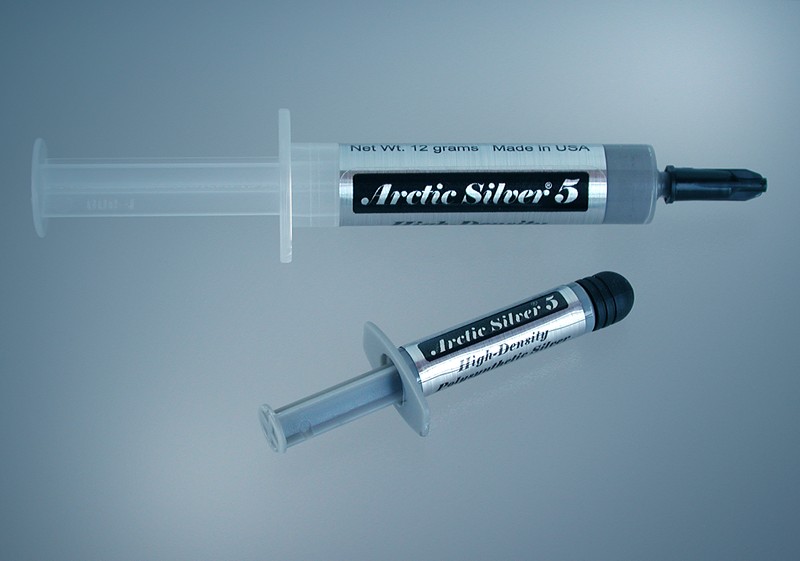
Dat wilde ik wel proberen, leek me een goedkope en simpele oplossing! Een tube van die superieure koelpasta kost een paar euro voor een kleine tube. Maar goed, op eBay.it even gezocht naar één van de betere koelpasta's en voor €6,50 inclusief verzendkosten heb ik de Arctic Silver 5 High-Density Polysynthetic Silver Thermal Compound in huis gehaald.

Op internet had ik in de tussentijd een goede site gevonden die aan de hand van duidelijke foto's uitlegde welke schroefjes in welke volgorde verwijderd moeten worden om het hart van mijn Airtje bloot te leggen. Redelijk snel en zonder problemen heb ik vandaag dan ook de laptop opgeschroefd, de koelplaat met stoffige ventilator verwijderd, de DIKKE KLODDERS APPELSTROOP verwijderd, de processoren schoongemaakt. En toen de nieuwe hypermoderne Artic Silver 5 erop gesmeerd. Op YouTube staan diverse filmpjes die showen hoe je dat het beste erop aan kunt brengen (vooral niet te veel). De ventilator heb ik eens goed schoongeblazen, mocht dat niet geholpen hebben dan kon ik voor ca.30 US$ een nieuwe bestellen op eBay.com dus daarvoor zoek ik de Apple Store niet eens op. Alles weer in elkaar geschroefd, laptop aan en... ik hoor niks! Heb ik de ventilator wel weer ingestoken op het mainboard? Uhh... ja, dat heb ik! Dan maar eens een echte applicatie opstarten.. nog niks. Toen maar smcFanControl opgestart (een mac-applicatie die o.a. de temperatuur van de processor weergeeft en waarmee de ventilatorsnelheid te beïnvloeden is), en jawel hoor, als ik de ventilator handmatig sneller instelde begon er idd iets te zoemen, maar omdat de temperatuur niet in de gevarenzone was geweest had de Air hetzelf nog niet nodig gevonden om de ventilator aan te slingeren. Een geweldige oplossing die echt werkt!

En bedenk bovendien dat het onder alle omstandigheden prettiger werken is als de ventilator niet of rustiger draait, en dat door het aanbrengen van twee druppeltjes koelpasta. Enige wat ik me dan wel afvraag waarom een toko die bekend wil staan om producten van hoogwaardige kwaliteit en design een dikke klodder goedkope rotzooi op het hart van de machine laat smeren. Ik schat dat het (uitgaande van een grotere bestelling dan één kleine tube) niet meer dan een paar cent per laptop kan kosten, laten we ruig doen en zeg 10cent. Als je bedenkt dat de goedkoopste MacBook Air  €1399,- kost, heb ik best wel €1399,50 (500% marge op de koelpasta erbij) over voor een nog stillere versie.

UPDATE 18/nov/09: al vrij snel na mijn ingreep bleek de reiniging van de fan (ventilator) niet goed gelukt te zijn en maakt de Air na een tijdje draaien weer een lawaai van jewelste. De positieve invloed van de betere koelpasta is echter nog zeer duidelijk aanwezig, maar als de fan dan toch sneller moet gaan draaien... Ik heb zojuist op eBay in China een nieuwe (originele Apple) fan besteld die over enkele dagen al hier zou moeten zijn. Incl. reiskosten komt die fan op minder dan €25,-. Daar ga ik niet voor naar de AppleStore ;)

UPDATE 18/dec/09: na exact een maand zijn gisteren de bestelde onderdelene (koelplaat en ventilator) bezorgd. Ze waren op tijd verstuurd; er stond 18/nov/09 op de US-poststempel, jawel het pakketje kwam uit de USA en niet zoals verwacht uit China, dus heeft bijna een maand bij de Italiaanse douane gelegen, maar het is nooit geopend geweest. Meteen de boel opengeschroefd, (het zijn verdomt kleine schroefjes, zeker die de ventilator op de koelplaat houden) en de koelplaat en ventilator vervangen. Voor de zekerheid heb ik weer een dun laagje verse koelpasta tussen de processoren en koelplaat aangebracht. Meteen de boel opgestookt door een dvd vanaf het netwerk te kijken en een zware Java-applicatie te draaien. De temperatuur schiet omhoog, de ventilator begint te draaien, en ja, er is een licht zoemen te bespeuren. Maar de brommer is verdwenen en het geluid lijkt stiller dan met de oude ventilator. Al met al een zeer geslaagde operatie, en, mits je een stevige hand hebt, best goed zelf te doen!

Saturday, 26 September 2009

VoIP of hoe kan het dat je ons kunt bellen op een Nederlands nummer in Italië?

Ik ben zojuist weer gebeld geworden op ons oude Nederlandse 045-nummer (regio Heerlen-Kerkrade dus). Leuk is altijd dat mensen verbaasd zijn dat we in Italië op ons oude nummer bereikbaar zijn (en dat dat ons vrijwel niets kost) terwijl menigeen in Nederland en Italië er al jaren gebruik van maakt, ongemerkt dan waarschijnlijk. Hoe kan dat nou???

even zo simpel mogelijk:
Internetbellen van KPN (of @home, of welke provider dan ook) wordt niet via de 2 oude draadjes van KPN gevoerd maar het gesprek wordt als kleine datapakketjes (zeg maar kleine MP3-bestandjes) op het internet gezet en verstuurd naar de andere kant.
Als beide partijen gebruik maken van internetbellen komt er geen conventionele telefooncentrale meer aan te pas, alles gaat in de vorm van datapakketjes en de modems van @home/KPN/XS4ALL/etc. zorgen voor het omzetten van spraak naar die pakketjes en weer terug. Dus, in JOUW modem wordt JOUW geluid (meestal spraak ;-) ) omgezet in pakketjes en via internet naar het modem van de ander gestuurd, daar wordt het dan weer in geluid omgezet.
Bel je met iemand die geen internetbellen heeft (of bel je naar een gsm) dan worden de pakketjes die in jouw modem zijn gemaakt via internet zo dicht mogelijk naar het netwerk van de ontvanger gebracht en daar worden ze dan door een modem omgezet in geluid geschikt voor het ouderwetse telefoonnetwerk of het gsm-netwerk.

Omdat geluid relatief weinig bandbreedte vraagt (3 min spraak kan in minder dan 1MB ) is het heel goedkoop en dus wordt internetbellen vaak heel goedkoop aangeboden, zo kun je vaak gratis bellen naar andere internetbellers (emailen en bestanden uitwisselen is toch ook gratis).

even een stapje ingewikkelder:
Maar hoe kan het dan dat wij op ons 045-nummer gebeld kunnen worden, we hebben hier in Italië immers geen abonnement bij KPN, @home, oid.
We hebben in 2007 ons KPN-abonnement in NL opgezegd en ik heb ons telefoonnummer overgezet (geporteerd) op VoIP (Voice over IP = geluid over internetprotocol). En dat heb ik niet gedaan (zoals vrijwel iedereen) bij mijn internetprovider maar bij een zogenaamde VOIP-provider. Nadeel van je eigen internetprovider is dat die je telefoonnummer koppelt aan je abonnement, wissel je van internetprovider dan loop je kans dat er iets mis gaat met de portering van je nummer, of ben je in ieder geval even wat minder goed bereikbaar.
Ik wil graag onafhankelijk zijn van mijn providers, dus gebruik ik geen email adres van hen (zoietsalsdit(at)home.nl), maar heb ik het domein sporck.it geregistreerd en maak ik mijn eigen email adressen aan (zoalsditdus(at)sporck.it). Zo ook met de telefoon, ik heb het telefoonnummer bij die VoIP-provider ondergebracht en ik kan onafhankelijk van plaats en internetprovider de telefoongesprekken ontvangen en voeren. Als je ons nummer belt dan gaan de datapakketjes via internet naar mijn VoIP-provider en die stuurt ze door naar mij. Is mijn modem thuis verbonden met internet dan rinkelt de telefoon in de kamer (in Italië).

maar het wordt nog mooier (en ingewikkelder):
Het protocol dat voor internetbellen meestal gebruikt wordt is het zogenaamde SIP-protocol, en om je aan te kunnen melden voor het kunnen voeren en ontvangen van gesprekken heb je maar twee (drie) dingen nodig:
1. het adres van de VoIP-server vd provider (bijv: sip.provider.nl)
2. een login en een wachtwoord
Normaliter voer je deze gegevens eenmalig in op je modem en vanaf dat moment kun je gesprekken voeren en ontvangen. Maar als ik die gegevens op mijn iPhone invoer in een SIP-programmaatje als fring kan ik ineens overal gebeld worden op ons Nederlandse 045-nummer op mijn iPhone, dus ook in de supermarkt, op het Lago Maggiore, op het vliegveld, of als ik in (bv) Nederland ben en op het WLAN van iemand terecht kan.


Nou gebruik ik het daar niet voor, maar het KAN wel!


En om het helemaal af/ingewikkeld te maken:
met het juiste modem kun je niet 1, niet 2, maar zelfs meerdere (in mijn geval een AVM Fritz!box 7170 voor 10 nummers) VoIP/SIP-accounts invoeren en ben je dus op meerdere nummers bereikbaar of kun je meerdere accounts gebruiken om te bellen. En zo zorg ik ervoor dat we zo goedkoop mogelijk bellen; zo bellen we vaste nummers in de meeste landen van de wereld gratis bellen mbv VoipBuster.
En natuurlijk heb ik ook een italiaans 'vast' VoIP-nummer uit de 0332-regio (Varese e.o.)...

en Skype dan?
Skype werkt alleen als je de software geïnstalleerd hebt en de PC hebt aanstaan, of een speciaal Skype-toestel koopt, maar dat is dan vrijwel hetzelfde als een SIP-toestel dat op zichzelf universeler is dan Skype.

Meer weten, zelf ook hebben???
mail me maar, maar kijk eerst vooral op sites van MottoVoIP (met name voor zakelijk gebruik) of BudgetPhone, of Google eens naar VoipBuster, Fring, enzo...!